
Back to Customer returns guide | Previous: Create a new return request | Next: Inspection in progress
Submitting a return request sends it to the brand or service team for review. After submission, the request enters the active returns workflow.
Before you submit
Check that the product details, return reason, contact information, attachments, and shipping or collection details are correct. If your brand has provided specific return instructions, follow them before submitting.
Submit the request
When the request is ready, submit it from the return form. TrackQUAL records the request and shows it in your returns list with a submitted status or the equivalent status configured by the brand.
You’ll also be given a label to print off and stick on the box. This is to help the brand easily determine returns from other packages. Any 6”x4” label printer should work well.
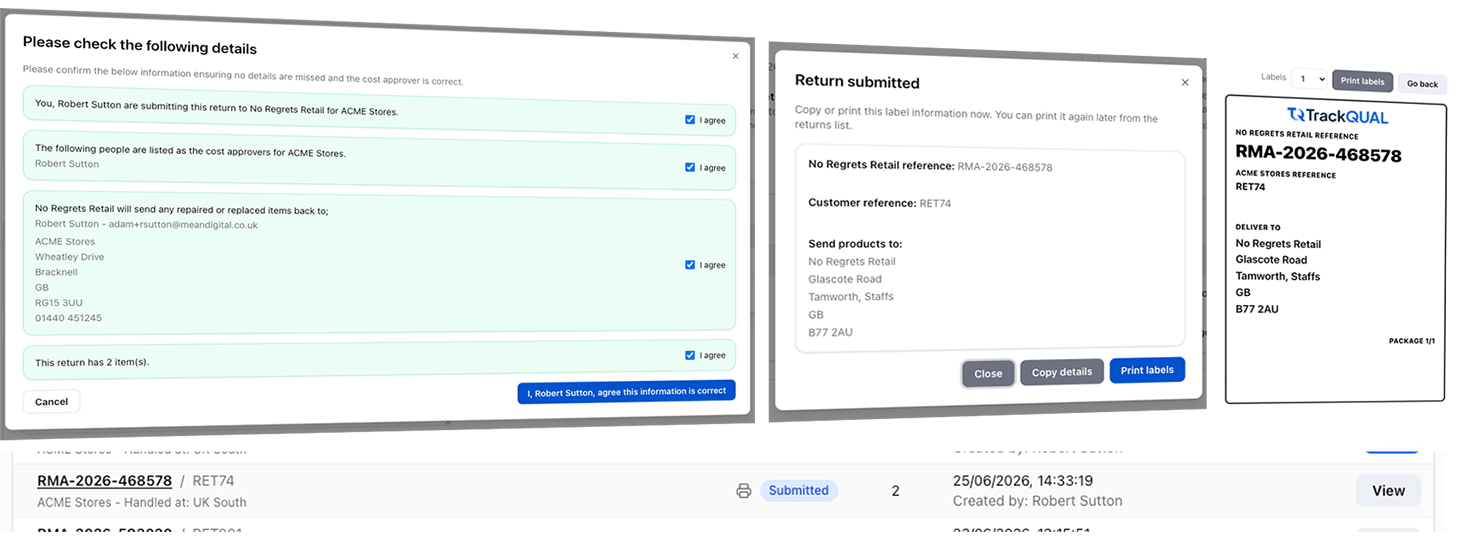
Once submitted, your return will appear in the returns table as shown above.
What happens after your return is received
After the brand receives the return request, the next operational step is usually to receive the product, confirm the details, and prepare it for inspection. You will see a received status when the brand has physically received the returned item.
Internally, processes will happen without a separate visible status. For example, the brand may allocate the return to an inspection team, check shipping paperwork, or prepare product records before the next visible update appears.
What you should do next
Watch for notifications or updates in your returns list. If the brand needs more information, respond as soon as you can so the return can keep moving.
The next step is the inspections.
Back to Customer returns guide | Previous: Create a new return request | Next: Inspection in progress